

This is probably only interesting for a minority. But eg for those few poor souls using a linux based living room setup with an AMD GPU hooked up to a 4K120 capable TV the struggles are finally over! No more shitty DP adapters which may or may not work with VRR.
Proof:
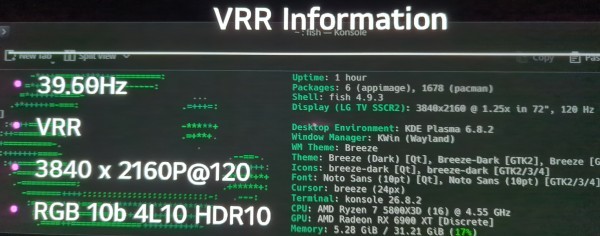
I thought VRR would only start working with 7.4. But here we are. 4L10 stands for 4 Lanes 10Gbits which isnt the full 48Gbits but the LG CX series can only do 40gbits for whatever reason. Its still 10bit 4:4:4.
It isnt activated by default from what i understand. In my case on CachyOS with Limine i had to add:
KERNEL_CMDLINE[default]+=" amdgpu.dcfeaturemask=0x400"
to /etc/default/limine
and to apply the changes run the following in your terminal:
sudo limine-mkinitcpio
After that reboot.
If you see VRR flickering on your KDE desktop go to the display configuration and set Adaptive sync from “always” to “automatic”. With that it shouldnt switch between 40hz and 120hz and vice versa when you stop or start using the mouse in desktop use. But when a game starts it should detect it and switch VRR automatically on.
You could also just wait a few weeks/months until 7.4 drops. Anyway, this makes me so fucking happy. Fuck the HDMI Forum!
Feel free to discuss what a dumbass i am for not buying a display port cabable display device.
You must log in or register to comment.
Good to know! I’m still waiting for HDMI 2.1 and i’m using a DP to HDMI adapter right now. I’ll probably wait for the new kernel to drop since i haven’t been gaming much on pc lately, but i was wondering since you mentioned LG C series: where did you find that VRR information overlay? Cause i’ve been looking for a way to check if i’m running full RGB because of this HDMI 2.1 stuff, but i don’t think there’s a way to check on the linux side, but i couldn’t find the info on my tv either.
Press the green button seven times on your remote and an overlay should pop up.
Ah, that’s a problem, i have a C5 and my remote doesn’t have a green button lol
oof,
i learned about all the hidden settings for my CX via: https://www.youtube.com/@hdtvtest
Maybe he has some videos for the C5 or slightly older modell which still applies too.
