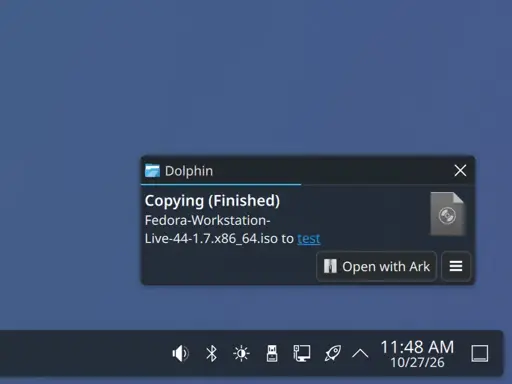
Wait, is this the fix to that annoying thing when you copy a large file to a slow USB/SDCard and the OS instantly reports the copy as being complete, but actually it’s just been written to RAM and is slowly being written to the actual media in the background, and if you “safely remove” the device you just have a broken incomplete file? Is this the fix for that, finally!?
Edit: YES, YES IT IS! HOLY SHIT, AMAZING!
The safely remove actually forces the data to be written on the disk.
Hmm, that might mean I have another issue as well. Since safely remove would just remove the device instantly without waiting…
For me, sometimes with huge files even if the copy process ended, and I do a “safely remove”, sometimes I still have to wait a big chunk of time. Safely remove is actually safe, nothing should be left. I also thought this was a feature of the filesystem, where it caches and optimizes the actions before doing it under the hood.
With something like System Monitor you should be able to see if anything is writing or reading on the filesystem constantly, before you do a disk remove.
I have hated “Safely Remove” from back when I was on Windows.
Always did weird GUI stuff and does on this too.So I just use
syncand when it properly finishes, I do safely remove.I always assumed “safely remove” is just a umount which in turn does the sync before returning.
I type
sync, then unmount/eject, then safely removeCan’t be too careful
Same, waiting for sync -f to finish would help most of the time.
I had the same with exFAT I think, maybe that is fixed too lets hope
I think this is a bigger deal than it sounds like when you consider cut and paste, or just moving files. The writing would’ve been thought to be done even if the cache is still flushing, so it deletes the source files, but the write can still fail after the source files are deleted. The device could fail, it could be unplugged, you might kick it by accident, or have a power outage.
The completion progress and complete notification only reflect copying to the local cache and not when the data is actually written out to the removable storage.
I was just recently talking about this with a colleague, who in the end, just said “Windows is better”.
Guess now KDE is better. Or has Windows fixed that problem too? (in that case it was kinda sporadic).what’s next?
they’ll allow you to have different wallpapers on different virtual desktops?
This technology is impossible! You are a rambling mad man for uttering such nonsense!
just use AI
set up workspaces or whatever they are called instead of virtual desktops. The ability to do independent wallpapers is like 50% of their features
They will never allow that again.
why?
Fucking finally. Been my biggest gripe for about a decade.
Does anyone know if this fix will be backported?
Not sure if this addresses the same problem (please let me know if not), but a fix that I’ve used for the past couple of years is one suggested in these discussions:
https://gist.github.com/2E0PGS/f63544f8abe69acc5caaa54f56efe52f
http://lwn.net/Articles/572911/essentially changing the values of
vm.dirty_background_bytesandvm.dirty_bytes. File transfers with the USB have been smooth and fast, on Plasma/Kwin, with this fix.And this post explains how to make such changes permanent:
https://unix.stackexchange.com/a/149140/515980
Maybe this is useful for people with older versions of Plasma.